Archive for the 'Hardware' Category


The Typing of the Dead: Getting Started

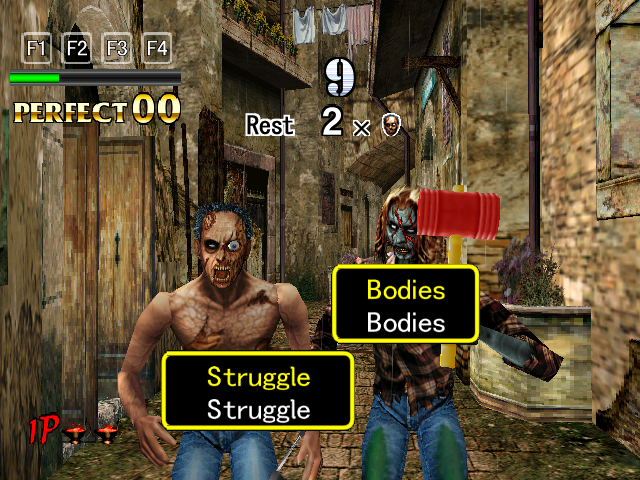
Bodies that struggleAnd while we’re talking about words as weapons, I really should bring this one out. One of the most absurdly-conceived educational games ever, The Typing of the Dead is a rail shooter — specifically, House of the Dead 2 — transformed into a typing tutor. Zombies stagger out labelled with words; typing the words damages them, with a gunshot sound accompanying each keystroke. The genius of this is that it naturally encourages touch-typing: you don’t dare look down at the keyboard when there are zombies shambling toward you, and there are as many in-game motivations to type quickly and accurately as there are to shoot quickly and accurately in the original game.

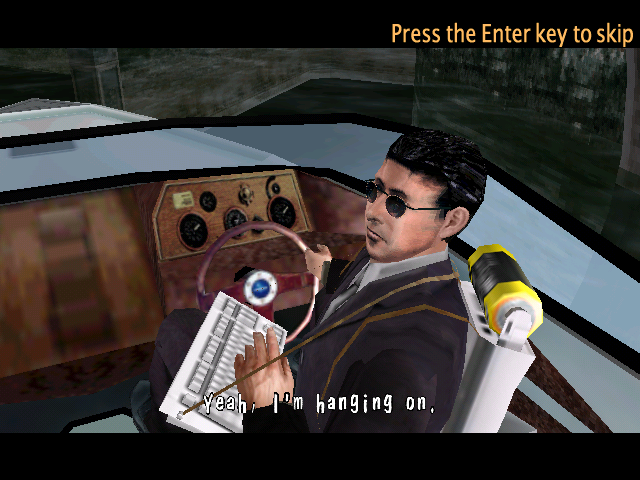
My name is a killing wordThe most completely brilliant thing about it, though, is that this change in the world model carries through to the character models. Everyone who has a gun in House of the Dead 2 instead has a keyboard strapped to their chest, connected to a Sega Dreamcast on their back (even in the PC port). You don’t normally see your own shots being fired, but there are some cutscenes where you can see NPCs typing the zombies to pieces.

The fact that it was originally a Dreamcast game actually poses some problems for the modern PC gamer. Many console ports from that era use graphics with palettized texture maps, which is something that’s been dropped from recent graphics cards. So much for Direct3D backward-compatibility! Playing this game with my ATI card makes the game revert to software rendering, which is not just slow and low-res, it’s glitchy. Transparency in textures seems to just not work at all. I’ve solved the problem by reinstalling my previous graphics card, the nVidia one. I had given up on this card because of its inability to handle recent games well, but it seems to do alright with something this old. (Also, having inspected it again, I have some suspicion that its only problem was overheating due to parts of the heatsink being clogged with dust.) It looks like I may be doing a lot of card-swapping in the future, as the Stack contains games that are incompatible with either card. Or maybe I should just clear all the console ports of that generation from the Stack at once.

Anyway, even though it shares a basic conceit with Bookworm Adventures, it’s not really the same type of game at all. Bookworm Adventures is turn-based, and asks you to come up with the killing words on your own, thus rewarding people with large vocabularies (both in the sense of vocabularies containing many words and in the sense of vocabularies containing large words). The Typing of the Dead is all about reflexes, and always tells you exactly what you should type.

Pokémon: Hardware Compatibility

I haven’t even mentioned my problems with trading. There are still several pokémon that I won’t be able to get any other way, either because they’re not available in the Blue version, or because the game forced me to choose a single pokémon out of two or three options. Since I started playing again, I’ve gotten together with one friend who had an old Gameboy and the red version, both untouched for years. We were all set to trade (or, more accurately, he was all set to charitably give me what he no longer had any interest in), but we hit a snag: he had a Gameboy Pocket, and I had a Gameboy Advance. And Nintendo, for whatever reason, saw fit to make the cables incompatible.

Now, for all I know there may be sound technical reasons for this. Maybe the two devices transfer data at different speeds or something. Or maybe the only difference is in the shape of the plug. It’s been difficult to get information about this. All I can say with any certainty is that, although Nintendo has made a “universal” Game Link adapter before the GBA, they never made an adapter for connecting the GBA to earlier versions. I’ve seen mention of a third-party adapter that might work, something billed as allowing you to use your old Gameboy cables with a GBA, but (a) it requires an old cable to plug into it and (b) it’s described in such vague terms that I don’t know for sure that it’ll do what I want anyway.

At this point, I’m thinking that the most cost-effective solution might actually be to buy a second GBA off ebay. That way I’d have everything necessary to consummate trades regardless of what hardware the other party has — indeed, all the other party would need to provide is the cartridge. It may even be cheaper than the adapters I’d otherwise need. My only hesitation is that doing trades between two Gameboys that are both mine, possibly by myself in the privacy of my room, is awfully close to “trading pokémon with myself”, which I’ve already gone on record as calling sad. (If I hadn’t made such a comment, I could probably do it without embarassment, of course. Heck, just playing Pokémon Blue at all in 2007 is something a lot of people would consider embarassing.)

Radeon HD 2600 XT

So, I’ve been seeing slow framerates on my machine under multiple games lately: first Myst V, then certain brief bits of Lego Star Wars 2 (which was generally pretty smooth, presumably because its style allows for a pretty simple world model), and now large sections of Psychonauts. Worse, I even had speed problems in Eternal Daughter, a retro sprite-based 2D platformer which I tried when it was featured on Play This Thing. Clearly something had to be done.

The problem is, when games are slow, it’s hard to figure out why. It could be either the CPU or the graphics card, and unless you have multiple machines, it’s impossible to test them individually. So I asked myself: If I bought a replacement for one of these things, and the replacement didn’t speed up these games, which one would I regard as less of a waste? And there was a clear answer to that: the graphics card.

See, my nVidia GeForce 7800 GTX card was giving me problems anyway. The GeForce drivers for Windows XP have a known bug that affects 3D objects displayed on a 2D bitmap background: frequently, random patches of the background will cover up any 3D elements. It’s really a quite striking visual effect, reminiscent of the scenes in Labyrinth and Indiana Jones and the Last Crusade where things that look like background turn out to be foreground, except not done on purpose. I wish I could post a screenshot that captures it, but (a) to get the full effect you really have to see it in motion and (b) to reproduce it I’d have to reinstall the GeForce card. Anyway, it makes several graphic adventures on the Stack unplayable. It’s been a a few years now since I first encountered the problem, and nVidia has issued multiple driver updates, but the problem remains. I’ve contemplated dealing with it by installing Windows 98, which uses different drivers that don’t share the problem, but switching to a non-nVidia card will spare me the trouble.

So, Psychonauts runs perfectly smoothly on my new Radeon, and I confidently expect to start blogging about Myst V soon. The new card has larger numbers associated with it than the old one, but I don’t want to say that that’s the reason for the the performance increase, as the old one was released after most of the games that gave it problems. More likely there was some sort of hardware malfunction. In researching the problem, I saw one person on a support forum who suffered abysmal framerate simply because the graphics card’s cooling fan wasn’t spinning. That wasn’t the case here (I checked), but it could easily be some similar failure.

Myst V: Still Trying to Get Started

I haven’t been doing much gaming for the last week or so. I’ve been busy, and expect to remain busy for another week or two. I did, however, take the time to do a little experiment. The company I work for has given me a Dell laptop — specifically, a Latitude D620. I installed Myst V on it, and sure enough, it gives a quite acceptable framerate in the part where it was bogging down to unplayability on my usual machine, which has a faster CPU and more memory. I may eventually just hook up the laptop to my monitor and mouse and play it from there, but this would be inconvenient for various reasons, so I’ll leave that as a last resort.

By now, I’ve played through the opening several times. After an intro sequence with a voice-over by Atrus, the game starts in the world (or “age”, as the Myst series calls them) of D’ni, in the chamber where the original Myst ended. Exploring from there, I soon met Yeesha, last seen as a little girl in Myst IV, now grown up and resembling the creepy messianic figure she appears as in Uru. 1 She said a bunch of stuff that I didn’t have enough context yet to understand. I remember from Uru that Yeesha has this annoying habit of never explaining what it is she’s talking about, as if she were one of the fragmentary journals that litter the series. Then I was teleported to another “age”, where someone called Esher gave me another spiel, mainly about not trusting Yeesha. This is the point where the framerate started really degrading, and I gave up shortly afterward. (There was a tunnel leading to some content, but I didn’t spend long on it.)

So I got speeches from Atrus and Yeesha and Esher, and after hearing them repeated, I’m starting to make a little sense of them. Atrus and Yeesha said things that might mean that Atrus is dead, although they both couched in terms vague enough to admit other possibilities: in a game where people routinely travel between worlds, to say that someone is no longer of this world doesn’t mean much. Also, Yeesha spoke of a “tablet” that “responded” to me, and which would be “released” after I did some stuff. I’m starting to think that this is a part of a certain small table-like structure of stone slabs that I was examining just before Yeesha appeared. Or maybe not. It would make sense of the claim that it “responded” to me — the table glowed or something the first time I poked it, although there didn’t seem to be any other effects, beyond triggering Yeesha’s cut-scene. It would be easier to interpret these speeches if they were written down rather than delivered orally.

Come to think of it, doesn’t the UI provide transcripts? Something to look into the next time I try it.


  1. For those not hip to Uru: It’s basically a multi-player online Myst spin-off, set some time after the games in the series proper. The online part was cancelled shortly after launch, then the content packaged as a single-player game, and more recently the online game has been launched again. I may join Uru Live after I finish Myst V. []

PSX-to-USB adaptors

Acting on the advice of many, I finally gave up and bought a different PSX-to-USB adaptor that has a better driver, one that allows me to arbitrarily reassign axes. Such devices are not expensive, but still, it rankles, because I didn’t really want or need a different adaptor. In terms of hardware, my new adaptor can’t be very different from my old one. Both devices take the same kind of signal, and produce the same kind of signal. All I really needed was a better driver. The driver for the new device was available for free download on the web, but Windows wouldn’t allow me to use it with the old adaptor.

I know very little about Windows device drivers, and less about USB, but presumably the two devices send some kind of signature that lets the USB host figure out which device it is. So it should be possible to hack the new driver to work with the old device by changing the signature it looks for. But figuring out how to do this would have involved more work than it took to earn the money I used to pay for the new adaptor.

Anyway, at least I should be able to play GTA3 properly now.

GTA3: Still Getting Started

I still haven’t got the right joystick to work correctly with GTA3, and I’m on the verge of giving up. There’s a part of the registry under HKEY_LOCAL_MACHINE\SYSTEM\CurrentControlSet\Control\MediaProperties\PrivateProperties\Joystick\ that clearly corresponds to my gamepad. Indeed, I can disable rumble effects by deleting certain keys under it, so it’s not like I’ve been completely unable to affect the way the joystick operates. According to various websites, including Microsoft’s joystick driver specs, I should be able to remap the axes by altering the “Attributes” value of the various sub-keys under “Axes”. Nothing I have done affects the axes at all in any way other than miscalibrating them. Like I say, I’ve almost given up, but I’d really like to get this working right, not just for GTA3, but for all the other games in the stack that don’t have in-game axis reconfiguration.

Anyway, in the process of testing my alterations in GTA3, I’ve noodled around in cars a bit. I’m beginning to see why this game was so popular. This is a very different game from the first two. The switch from top-down fixed camera angle to a more street-level view has a greater effect on the experience than I thought it would, mainly that it gives a better sense of motion, that you’re careening along the street and onto the crowded sidewalk and so forth. It also has a different feel from its imitators, such as Jak 2, which tend to be set in more fantastical environments. Liberty City is based on New York City. I live in New York City. The sites in this game — the decaying tenements, the tiny fenced-in parks, the storefronts jammed into grey concrete — are familiar to me, and modelled well enough to really evoke the real thing. I can’t explain why it’s enjoyable to play with an imitation of someting that I could see just by walking around outside, but it is.

GTA3: Getting Started

Surely, Grand Theft Auto 3 is one of the games that any game-literate person must know, one of the defining games of this decade. Not only has it been tremendously influential to the industry, it’s controversial enough to have become one of the few games that even non-gamers have heard of. It’s even been satirized in a soda commercial. Strange to think that it’s taken me this long to get around to playing it.

My reasons for not playing it yet are not good ones. They stem from my completist leanings: I don’t like to play series out of order if I can help it. Thus, I didn’t want to start GTA3 until I had finished GTA2, even though there’s no continuity of story or anything like that. And it took me a while to get around to playing through GTA2 simply because it wasn’t all that good. Its faction system was an interesting experiment, but it encouraged somewhat tedious gameplay. The easiest way to complete many of the missions was to pacify the gang whose turf you’d be invading in advance, which you could do by killing your unresisting allies in the target gang’s rival gang. Still, I finished GTA2 a few months ago, and then took a months-long break from the series.

Even now, I haven’t really made a serious go of it. I’m having some difficulty getting it to work properly with my joystick, a PS2 Dualshock controller connected to my PC via a PSX-to-USB adaptor from Radio Shack. The problems I’m having are problems I’ve had before: the right analog stick seems to have its axes swapped, so that pressing forward and back rotates the camera and pressing left and right zooms in and out. Various websites suggest registry hacks to fix this, but nothing has worked yet. I suppose I could just go to keyboard/mouse controls, but that just seems wrong for something that’s primarily a PS2 game.